SitePlex Feature Showcase
This page showcases some of the features I’ve worked on for SitePlex.
User Search
<!-- Search input -->
<div class="search">
  <input
    type="search"
    id="searchQuery"
    placeholder="Search by name, email, or role..."
  />
</div>

<table id="userTable" class="table">
  <tr>
    <th>Name</th>
    <th>Email</th>
    <th>Role</th>
  </tr>

  <!-- User rows here -->
</table>
document.getElementById('searchQuery').addEventListener('input', function () {
  const query = this.value.toLowerCase();
  const rows = document.querySelectorAll('#userTable tr');

  rows.forEach((row, index) => {
    if (index === 0) return; // skip header row

    const name  = row.querySelector('td:nth-child(1)')?.textContent.toLowerCase() || '';
    const email = row.querySelector('td:nth-child(2)')?.textContent.toLowerCase() || '';
    const role  = row.querySelector('td:nth-child(3)')?.textContent.toLowerCase() || '';

    row.style.display =
      name.includes(query) || email.includes(query) || role.includes(query)
        ? ''
        : 'none';
  });
});
What it does
Adds an instant, client-side search bar for the user table. As the user types, rows are filtered by name, email, or role.
Uses an input event listener and toggles row visibility (`display: none`) for non-matches. It works cleanly without external libraries and keeps the UI responsive.
Add QR Code Sign in and Forms
<!-- Sign-in QR shown separately -->
<a href="{{ route('qrcode.signin.show', ['uuid' => $signInQr->uuid]) }}" target="_blank">
  Sign In QR Code
</a>

<!-- Form QRs -->
<a href="{{ route('qrcode.submit', ['uuid' => $qrCode->uuid]) }}" target="_blank">
  {{ $qrCode->form->title }}
</a>

<!-- Print QR PDF -->
<a href="{{ route('qrcode.pdf', ['uuid' => $qrCode->uuid]) }}" target="_blank">
  Print QR Code
</a>
<!-- visitorsignin/qr-show.blade.php -->

<div class="returning-search">
  <input id="name-filter-signin" class="form-control"
         placeholder="Start typing your name...">
</div>

<div class="returning-list">
  @foreach($signInUsers as $user)
    <div class="user-row-signin" data-name="{{ mb_strtolower($user->name) }}">
      <div>
        <strong>{{ $user->name }}</strong>
        @if($user->company)
          <div class="small text-muted">{{ $user->company }}</div>
        @endif
      </div>

      @if(!empty($user->is_currently_signed_in))
        <button class="btn btn-secondary btn-xs" disabled>Already Signed In</button>
      @else
        <form action="{{ route('qrcode.signin', ['uuid' => $qr->uuid]) }}" method="POST">
          @csrf
          <input type="hidden" name="name" value="{{ $user->name }}">
          <button type="submit" class="btn btn-signin-main btn-xs">Sign In</button>
        </form>
      @endif
    </div>
  @endforeach
</div>

<script>
const input = document.getElementById('name-filter-signin');
const rows  = document.querySelectorAll('.user-row-signin');

if (input && rows.length) {
  rows.forEach(r => r.style.display = 'none');

  input.addEventListener('keyup', () => {
    const q = input.value.trim().toLowerCase();

    rows.forEach(row => {
      if (q.length < 2) return row.style.display = 'none';
      row.style.display = (row.dataset.name || '').includes(q) ? '' : 'none';
    });
  });
}
</script>
public function handle()
{
  $baseUrl = Tenant::find(tenant('id'))->queue_base_url;

  // Generate QR codes for all projects
  foreach (Project::all() as $project) {

    // Form QR (type = QRCODE_FORM, form_id = {id})
    $this->generateOrRestoreQr($project, QrCode::QRCODE_FORM, $baseUrl, $this->form->id);

    // Sign-in QR (type = QRCODE_SIGNIN, form_id = null)
    $this->generateOrRestoreQr($project, QrCode::QRCODE_SIGNIN, $baseUrl, null);
  }
}

private function generateOrRestoreQr($project, $type, $baseUrl, $formId = null)
{
  // Avoid duplicates + restore soft deleted
  $qr = QrCode::withTrashed()
    ->where('project_id', $project->id)
    ->where('form_id', $formId)
    ->where('type', $type)
    ->first();

  if ($qr) { if ($qr->trashed()) $qr->restore(); return; }

  $uuid = (string) Str::uuid();
  $url  = $type === 1 ? "$baseUrl/qrcode/$uuid" : "$baseUrl/qrcode/signin/$uuid";

  // Use QR package to generate PNG
  $png = QrCode::format('png')->size(1024)->margin(0)->generate($url);

  $filename = $formId ? $formId . '.png' : 'signin.png';
  $path = 'app/' . get_company_subfolder() . '/qr-codes/' . $project->id . '/' . $filename;

  Storage::disk('s3')->put($path, $png, 'public');

  QrCode::create([
    'type'       => $type,
    'project_id' => $project->id,
    'form_id'    => $formId,
    'uuid'       => $uuid,
    'image_path' => $path,
  ]);
}
What it does
This feature adds QR code-based sign-in and form submission through unique URLs for each project and form.
QR codes are generated in a queued job and stored on S3. The job restores previously soft-deleted QR codes instead of creating duplicates.
REST API for QR Codes
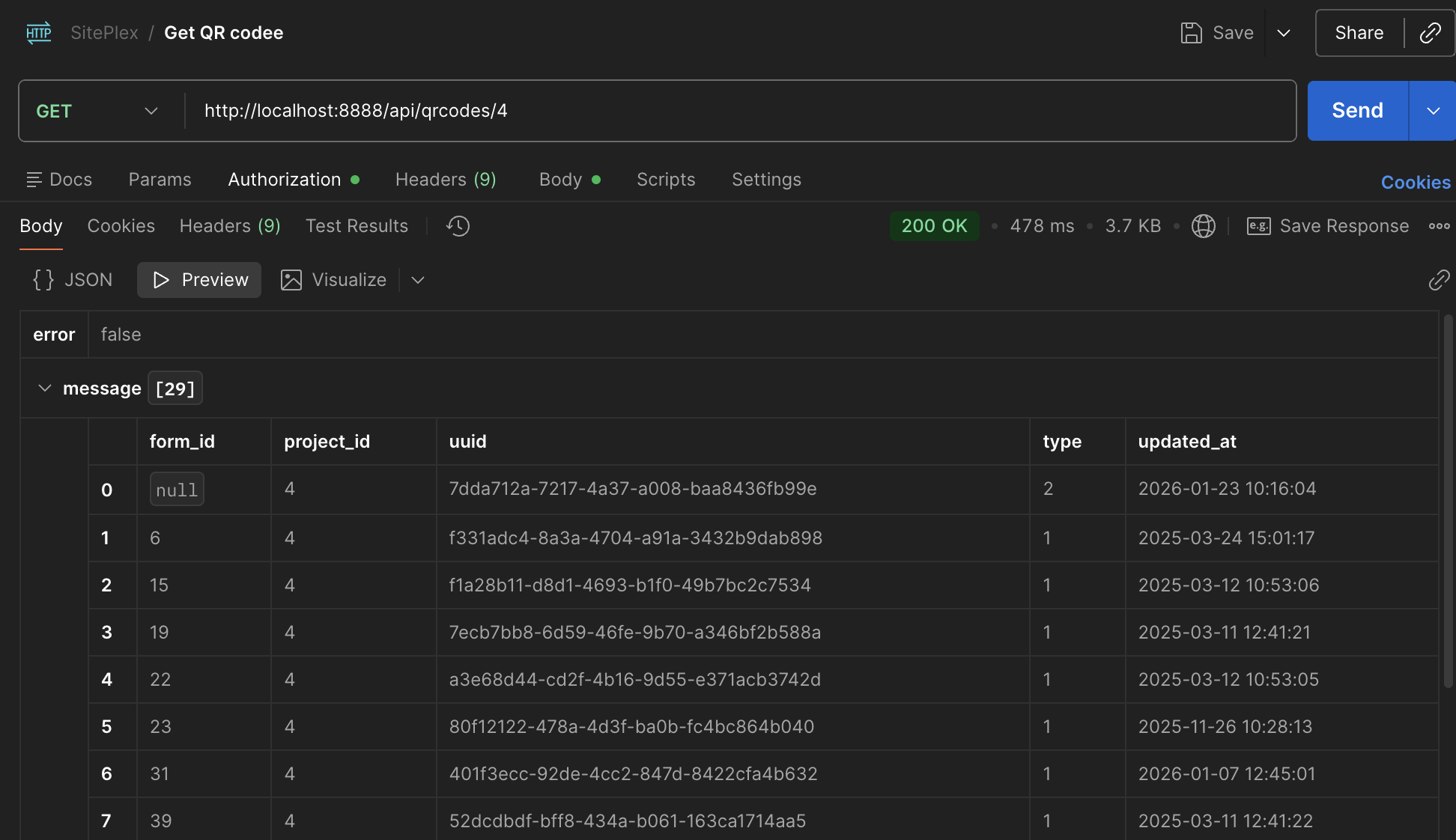
class QrCodeApiController extends ApiController
{
    // GET /qrcodes/{project}?api_token=...&from_date=Y-m-d H:i:s
    public function index(Project $project, Request $request)
    {
        $validator = Validator::make($request->all(), [
            'from_date' => 'nullable|date_format:Y-m-d H:i:s',
        ]);

        if ($validator->fails()) {
            return $this->respondBadRequest($validator->messages());
        }

        $qrCodes = QrCode::where('project_id', $project->id)
            // Keep sign-in QR (form_id null) + only non-deleted forms
            ->where(function ($q) {
                $q->whereNull('form_id')
                  ->orWhereHas('form', function ($sub) {
                      $sub->whereNull('deleted_at');
                  });
            })

            ->get(['form_id', 'project_id', 'uuid', 'type', 'updated_at']);

        return $this->respondOK(
            $qrCodes->map(function ($qr) {
                return [
                    'form_id'    => $qr->form_id,              // null for sign-in
                    'project_id' => $qr->project_id,
                    'uuid'       => $qr->uuid,
                    'type'       => $qr->type,                // 1=form, 2=sign-in
                    'updated_at' => $qr->updated_at->format('Y-m-d H:i:s'),
                ];
            })
        );
    }
}
<!-- tenant.php (routes) -->

<!-- API  -->
Route::get('qrcodes/{project}', 'App\Http\Controllers\Api\QrCodeFormApiController@index');
What it does
Implemented a REST-style endpoint to list a project’s QR codes (forms + sign-in) and support incremental sync via from_date.
This powers the mobile app by keeping QR links up to date without re-downloading everything.
The endpoint validates request params, filters out QR codes linked to deleted forms, and always includes the project’s Sign-In QR (stored with a null form_id).
QR Form Submission with Eloquent
<!-- qrcode form submit -->
<form method="POST" action="{{ route('qrcode.submit.store', $qrCode->uuid) }}">
  @csrf

  @foreach($formVersion->sections as $section)
    <h4>{{ $section->title }}</h4>

    @foreach($section->fields as $field)
      <label for="field-{{ $field->id }}">{{ $field->label }}</label>
      <input
        id="field-{{ $field->id }}"
        name="fields[{{ $field->id }}][value]"
        value="{{ old("fields.$field->id.value") }}"
      />
    @endforeach
  @endforeach

  <label>
    <input type="checkbox" name="draft" value="1"> Save as draft
  </label>

  <button type="submit">Submit</button>
</form>
public function store(CompletedFormRequestWeb $request, string $uuid)
{
    $qrCode = FormQrCode::query()
        ->where('uuid', $uuid)
        ->with(['form.latestPublishedVersion.sections.fields'])
        ->firstOrFail();

    $formVersion = $qrCode->form->latestPublishedVersion;

    $answers = collect($request->input('fields', []))
        ->map(fn ($field, $fieldId) => [
            'field_id' => $fieldId,
            'value'    => $field['value'] ?? null,
        ])
        ->values()
        ->all();

    DB::transaction(function () use ($request, $qrCode, $formVersion, $answers) {
        $submission = CompletedForm::create([
            'form_id'         => $qrCode->form_id,
            'form_version_id' => $formVersion->id,
            'project_id'      => $qrCode->project_id,
            'user_id'         => auth()->id(),
            'submitted_by_qr' => true,
            'draft'           => $request->boolean('draft'),
            'submitted_at'    => now(),
        ]);

        $submission->answers()->createMany($answers);
    });

    return redirect()->route('qrcode.confirmation');
}
class CompletedForm extends Model
{
  protected $fillable = [
    'form_id',
    'form_version_id',
    'project_id',
    'user_id',
    'submitted_by_qr',
    'draft',
    'submitted_at'
  ];

  public function answers()
  {
    return $this->hasMany(CompletedFormAnswer::class);
  }
}
What it does
Built a QR form submission flow using Eloquent to load the correct published form version, collect dynamic field input, and save the submission along with its related answers.
Used relationships, eager loading, and a database transaction to avoid unnecessary queries and maintain data consistency for both draft and final submissions.